
2025-06-25 / 搜索自动埋点
重要
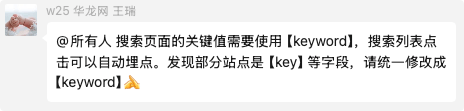
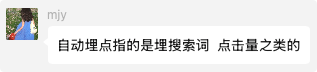
自动埋点指的是埋搜索词、点击量之类的,如下两个 js 文件依旧必不可少!
html
<!-- 华龙芯 埋点 -->
<script type="text/javascript" src="/public/hlx-buried-point.js"></script>
<!-- 华龙芯 加密 -->
<script type="text/javascript" src="/public/bundle.min.js"></script>条件一 和 条件二 需要同时满足!!!
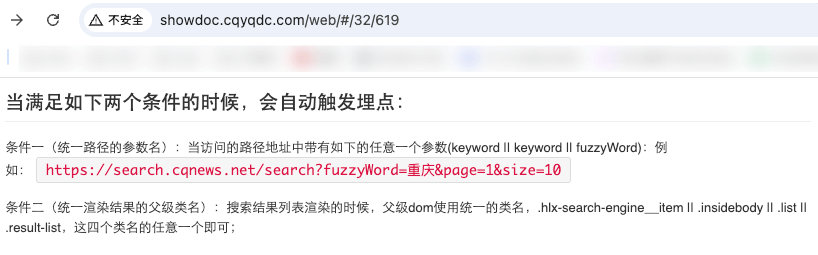
条件一 和 条件二 需要同时满足!!!
条件一 和 条件二 需要同时满足!!!
条件一
使 keyword 和 fuzzyWord
如:
https://search.cqnews.net/search?fuzzyWord=重庆https://search.cqnews.net/search?keyword=重庆
条件二
.hlx-search-engine__item
.insidebody
.list
.result-list
搜索页 代码示例
html
<!DOCTYPE html>
<html lang="zh-CN">
  <head>
    <meta charset="UTF-8" />
    <meta
      name="viewport"
      content="width=device-width, initial-scale=1.0, maximum-scale=1.0, user-scalable=no"
    />

    <title>搜索页 代码示例</title>

    <meta name="sid" th:content="${config.appId}" />
    <meta name="catalogsId" th:content="${config.mainColumnId}" />
    <meta name="businessId" th:content="${config.businessId}" />
    <meta name="businessType" th:content="${config.businessType}" />
    <meta name="title" th:content="${column.name}" />

    <!-- 使用华龙网线上 埋点js -->
    <script type="text/javascript" src="/public/hlx-buried-point.js"></script>

    <!-- 使用华龙网线上 搜索参数签名js  -->
    <script type="text/javascript" src="/public/bundle.min.js"></script>
  </head>

  <body>
    <hlx-template
      component-type="column"
      component-query-option="{'columnId':''}"
      component-variable="column"
    ></hlx-template>
    <hlx-template
      component-type="comConfig"
      component-query-option=""
      component-variable="config"
    ></hlx-template>

    <div class="hlx-search-engine__item">
      假如 search 的数据将在这里进行渲染
    </div>
  </body>
</html>