
制标
查看指标文档需要华龙网内网 VPN,即 SecureLink,https://www.wangsu.com/app/securelink
华龙芯制标API的详细文档 :http://showdoc.cqyqdc.com/
✨ 什么是制标?
现在我们可以在华龙芯上制作纯粹的静态页面,但这显然是不能用的,因为还缺少关键的数据。
制标就是用于完成这一步。
华龙网使用 rouyi 框架作为 web 后端,制标的模版语法使用的 Thymeleaf。
我们将用两个例子来说明制标
✨ 制作列表模版
html
<!doctype html>
<html lang="zh-CN">
  <head>
    <!-- 省略 ... -->
  </head>

  <body>
    <div class="hlx-start-root-v1_3">

      <!-- 通过 华龙芯的 hlx-template 获取 分页+列表 -->
      <hlx-template
        component-type="newsPageTotal"
        component-query-option="{'columnIds':[],'start':0,'page':10000,'count':20,'showMedium':'PC'}"
        component-variable="newsList"
      ></hlx-template>

      <!-- 通过 华龙芯的 hlx-template 获取当前栏目 信息 -->
      <hlx-template
        component-type="column"
        component-query-option="{}"
        component-variable="currentColumn"
      ></hlx-template>


      <div class="hlx-list-container w1400">
        <!-- 通过 th:text 将 currentColumn.name 写入到 div 的 innerText -->
        <div class="hlx-list-title" th:text="${currentColumn.name}"></div>

          <!-- 通过 th:each 对  newsList.list 进行 for迭代 -->
          <!-- 通过一些列 th 将数据写入 -->
          <a class="hlx-list-item" th:each="item : ${newsList.list}" th:href="${item.article.pcUrl}">
            <div class="title" th:text="${item.listTitle}"></div>
            <div class="date" th:text="${item.pubTime.substring(0, 10)}"></div>
          </a>
        </div>

    </div>


  </body>
</html>✨ 制作详情模版
html
<!doctype html>
<html lang="zh-CN">
  <head>
    <!--  -->
  </head>

  <body>
    <div class="hlx-start-root-v1_3">

      <!-- 获取数据 -->
      <hlx-template
        component-type="news"
        component-query-option="{'newsId':''}"
        component-variable="article"
      ></hlx-template>

      <div class="hlx-detail-container w1400">
        <!-- 写入 article.title -->
        <div class="hlx-detail-title" th:text="${article.title}">这里有没有内容没关闭,都会被 华龙芯 替换掉 </div>

        <!-- 写入 相关数据 -->
        <div class="hlx-detail-infos d-flex flex-column align-items-center  justify-content-center flex-md-row">
          <div class="label">
            来源:<span th:text="${#strings.isEmpty(article.source)} ? '大足人大' : ${article.source}"></span>
          </div>
          <div class="label">
            发布时间:
            <span th:text="${#dates.format(article.pubTime, 'yyyy年MM月dd日 HH时mm分')}">2024年12月26日 11时3分</span>
          </div>
          <div class="label">
            【字体大小:<span style="cursor: pointer;margin-right: 4px;" onclick="changeHlxDetailFontSize(16)">小</span>
            <span style="cursor: pointer;" onclick="changeHlxDetailFontSize(24)">大</span>】
          </div>
        </div>

        <div class="hlx-line"></div>


        <div class="hlx-news-detail">
            <!-- 注意,详情是 th:utext !!!  -->
            <div th:utext="${article.content}"></div>
        </div>
      </div>

    </div>
  </body>
</html>th:utext 是富文本写入, th:text 是纯文本写入,详情可见华龙网内网文档:http://showdoc.cqyqdc.com/
提示
详情的content 的div 一定要设置 img {max-width:100%},否则移动端图片很容易超出屏幕。
同理视频也是。
✨ include
之前提到过的,需要将公共部分独立出来,如 header 与 footer,如何使用?
将一切都配置好后,查看 url 地址 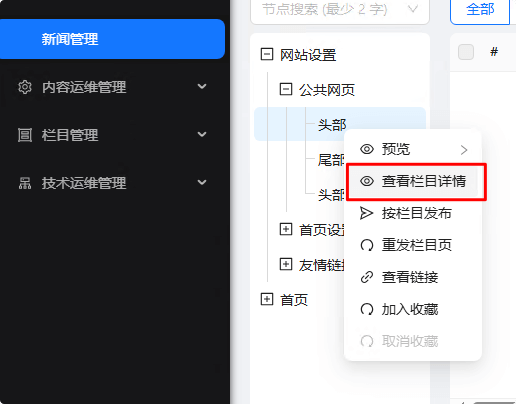
然后通过如下语法进行使用
html
<!--#include virtual="/web/column/col5002316.html"--><!--#include 这里面不能有空格,即使不能为这样
<!-- #include
部分格式化工具会自动加速空格!!!请尤其注意。