
微信分享埋点
微信配置
首先,你需要拥有一个微信公众号(没有需要注册微信一个公众号),并在微信公众平台上进行注册和认证。
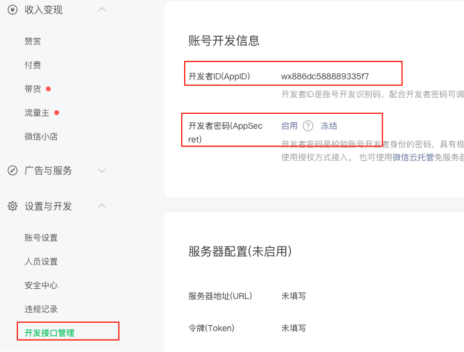
获取微信分享接口权限:在微信公众平台中,你需要配置网页授权获取用户基本信息和分享接口权限,获取到对应的 AppID 和 AppSecret。
然后设置域名
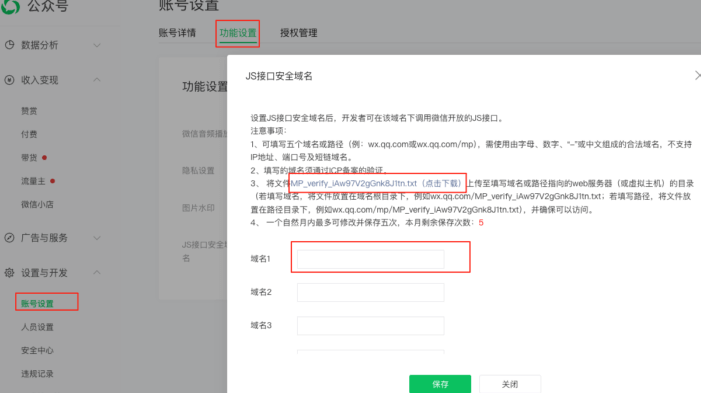
注意
这里的 JS 接口安全域名就是你需要进行二次分享页面的域名。
该域名需要通过 ICP 备案验证。
域名不能带协议,否则会报错,无法分享成功!!!
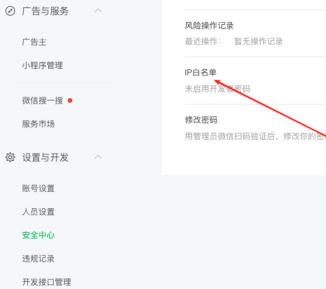
设置 华龙芯 IP 白名单
华龙网配置
拿到微信 AppID 和 AppSecret 后进入华龙芯后台进行配置
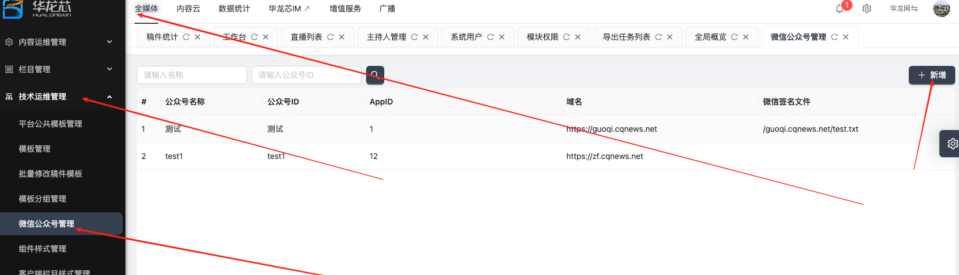
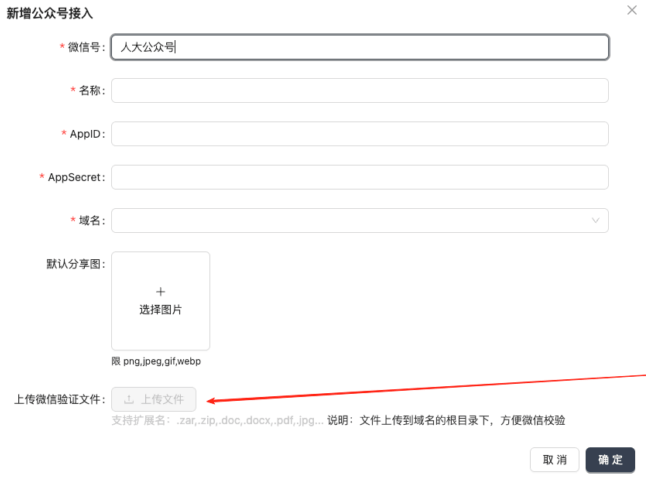
上传微信验证文件
微信会提供一个文件,你需要将其放在服务器上供微信访问,从而判断是否拥有这个域名
“上传微信验证文件”就是做这个用的
华龙芯代码
华龙芯文档原话
注意:对应使用的地方要保障存在 jquery 的引用;
可能是 hlx-wechat.js 依赖 jquery,这个自行验证。
华龙网微信分享埋点方式:
html
<script type="text/javascript" src="/public/hlx-buried-point.js"></script>
<script type="text/javascript" src="/public/hlx-wechat.js"></script>注意!
这两个是新增的!之前的基础埋点也要有!!!
  <hlx-template component-type="news" component-query-option="{'newsId':''}" component-variable="article"></hlx-template>
  <script>
       <script>
        var shareImgUrl = `[[${article.shareData.shareImage}]]`;
        var wxshareInfo = {
            shareTitle: `[[${article.shareData.shareTitle}]]`,
            shareDescription: `[[${article.shareData.shareDescription}]]` || "重庆人大网",
            shareUrl: `[[${article.shareData.shareUrl}]]` || window.location.href,
            shareImgUrl: (shareImgUrl.indexOf("http") === 0) ? shareImgUrl :window.location.protocol+shareImgUrl
        }
        WeChatSecondaryShare(wxshareInfo);
    </script>
</script> <hlx-template component-type="column" component-query-option="{'columnId':''}" component-variable="column"></hlx-template>
<script>
var wxshareInfo = {
shareTitle: `[[${column.name}]]`,
shareDescription: `[[${column.description}]]` || "华龙网",//按实际情况取值
shareUrl: window.location.href, // 按实际情况取值,这只是举例子
shareImgUrl: '',// 支持自定义图片地址
}
WeChatSecondaryShare(wxshareInfo);
</script> <hlx-template component-type="news" component-query-option="{'newsId':''}" component-variable="article"></hlx-template>
<META name="shareTitle" th:content="${article.shareData.shareTitle}" /> // 如果取值为空就要用${article.title}
<META name="shareDescription" th:content="${article.shareData.shareDescription}" /> // 如果取值为空,可以自己给一个默认值
<META name="shareUrl" th:content="${article.shareData.shareUrl}" /> // 如果取值为空,就取window.location.href(当前网页地址)
<META name="shareImgUrl" th:content="${article.shareData.shareImage}" /> <hlx-template component-type="column" component-query-option="{'columnId':''}" component-variable="column"></hlx-template>
<META name="shareTitle" th:content="${column.name}" />
<META name="shareDescription" th:content="${column.description}" /> // 按实际情况取值就可以啦
<META name="shareUrl" content="" /> // 就取window.location.href(当前网页地址)
<META name="shareImgUrl" content="" /> // 支持自定义图片地址